
A sole practitioner building a stack of free tools, and the rules I follow to design them
Jake White MCIAT | Jake White Architecture
The best tools in our industry are built for the biggest firms in it. Enterprise software, enterprise prices and an enterprise IT department to keep it all running. For the micro, small and medium studio; client expectations for quality and speed are simillar whilst those practices have limited access to practice and design automation tools.
It’s no bad thing that very large architectural firms have spearheaded software development. Much of what eventually reaches the rest of us was proven first at that scale, on their budgets, and for many years, we have been glad of it. But now something has shifted; the open standards and open-source libraries that those firms helped mature are now free for anyone to pick up. For a long time, the price of good technology was itself a kind of moat, the thing that kept the small to medium sized studio a step behind. That moat is draining. I don’t think that’s a threat to anyone. I think it’s the most interesting thing to happen to small practice in a generation.
My very small part in this shift: I am a Chartered Architectural Technologist running a micro practice, not a software engineer, and I have no plans to become one. What I do have is the habit of identifying frustrating, slow and repetitious tasks and questioning whether the task was a valuable use of my time. Until recently, addressing a small number of pain points might have been possible with some Excel or limited Python scripting. But more recently this shift has opened up the opportunity to tackle the far more complex that slow productivity down.
AI has reached the point where someone like myself can describe a tool in plain language and watch it take shape. Vibe-coding, is what they call it. I use it to build small, free tools that each do one thing well, and I plan to give every one of them away. So let’s ‘vibe-code’ our way to a more technologically equitable future. From where I’m sitting, it has already begun.
The first tool I have finished is called StairSmith and it does a single job. It allows the user to quickly model a domestic staircase.
You set the width, the height and the number of treads. You pick straight, L-shaped or U-shaped. You add a balustrade or a wall to either side, swap a flat landing for winders, and flip the whole thing with a click. When it looks right, it exports a classified IFC 4×3 model for your BIM workflow and a 2D DXF, plans, sections and elevations, for your CAD. No login. No install. Nothing you draw leaves your browser. It is free, and it stays free.
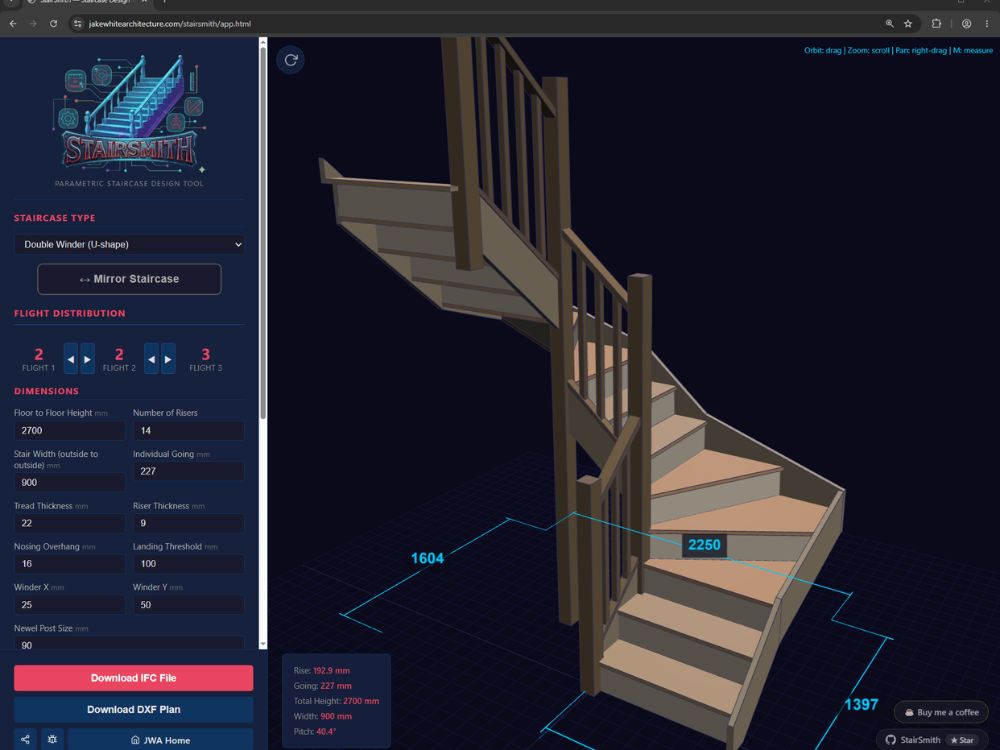
Above: a screenshot of Stairsmith in action.
StairSmith didn’t appear by magic, and that is the point. I built it to a set of rules that keep the process lean and productive. Ten of them, these rules are as much for me as for anyone thinking of trying this.
My ten vibe coding rules
- Encode your expertise, then give it away. Vibe coding turns what you know into a working tool. Open-sourcing it keeps that knowledge inside the profession. AI poses a risk to that knowledge, but by attaching an open source license, we ensure it’s available to all.
- It must make a big impact. There is a temptation to build an unlimited array of tools. You’ve had an idea; now you would like to turn this idea into a real tool. But do you genuinely need this? How much time would your office save by using it, and how regularly would that time saving occur? Can the time spent be justified?
- Never build a tool that claims to assure compliance. A tool can calculate, draw, convert and inform. It must never return a verdict on regulatory compliance. That judgement belongs to a responsible professional, in context, not to software. If you build something near that line for your own use, keep it off the public web.
- One project at a time. Ship it or kill it before the next one starts.
- The thirty-minute rule. If you cannot build a rough, working version in thirty minutes, drop the idea. No parking, no later.
- Keep learning, do not skip the fundamentals.You will start out knowing very little, and that is fine, but to successfully build tools you will need to learn a lot. Understand the core ideas: languages, libraries, file formats. Every project widens that ground.
- Plan first, build second. Shape the idea and write the Requirements.md file in conversation with a chat model. Only once said document accurately reflects your vision and has been sense-checked through your chat; hand it to a coding agent, wired to a Git repository and free to commit for you to build from.
- Go to the source for standards. When a tool touches a format or standard, IFC, DXF, or a coordinate system, read the actual specification. A model’s memory of such standards my be limited or sometimes concocted, so always research these systems by searching the documentation online.
- Design for data sovereignty. Avoid tools that hold client data or need a login. Keep them stateless and local, so nothing leaves the user’s machine, and check it with network traffic analysis. Avoid using local AI agents on a machine where you plan to test a tool via Localhost as this is a potential security risk.
- Launch in beta. Court the feedback. Put public tools out as beta and actively ask users to report any issues they find, then resolve them.
StairSmith has been designed using these principles. It will let you design a staircase that meets every line of Approved Document K and just as happily let you design one that breaks all of them. It does not stop you from doing so; I built it not to on purpose. Partly so that users could use it to model staircases in existing properties which are not compliant. But more importantly, compliance guarantees are not embedded in your existing CAD software. AutoCAD does not refuse to draw a scheme that planning will reject. The competence must always remain with the hand on the mouse.
What’s coming next
StairSmith is the one that’s ready. Behind it are others, each born from a job that took longer than it should have, all still in development.
- SunForm reads an IFC model and analyses solar shading of a proposal within its context.
- RED_LINE turns a site boundary drawn in CAD into a GeoJSON format ready for onward use.
- INVERTS speeds up simple drainage design, working out invert depths and falls and arranging that data correctly for DXF export.
- FileUzi files project emails and attachments by job, storing key attachments in subfolders for both incoming and outgoing emails.
- ArcKanBan is a to do list built around the KanBan approach and the RIBA plan of works stages.
The above ideas are currently a work in progress at the moment, but these will launch soon. Watch this space.
None of this needed permission, or a budget, or a computer science degree. It needed the belief that the gap was mine to close. If you’ve ever caught yourself thinking someone should build that, I would gently point out that someone could be you, and that the industry as a whole could benefit.
About the author
Jake White MCIAT is a Chartered Architectural Technologist running Jake White Architecture in Mid Sussex, serving the Sussex and Surrey areas. He specialises in residential design, extensions & new builds.